一、 TypeScript简介 TypeScript 由**微软开发,是基于JavaScript 的一个 扩展语言**。
TypeScript 包含了JavaScript 的所有内容,即: TypeScript 是JavaScript的**超集**。
TypeScript 增加了:静态类型检查、接口、泛型等很多**现代开发特性,因此更适合 大型项目**的开发。
TypeScript 需要**编译**为JavaScript ,然后交给浏览器或其他JavaScript 运行环境执行。
二、为何需要TypeScript 2.1、今非昔比的JavaScript (了解) JavaScript当年诞生时的定位是浏览器**脚本语言,用于在网页中嵌入一些 简单的逻辑**,而且代码量很少。 随着时间的推移,JavaScript变得越来越流行,如今的JavaScript已经可以**全栈编程**了。 现如今的JavaScript**应用场景比当年 丰富的多, 代码量也比当年 大很多**,随便一 个JavaScript项目的代码量,可以轻松的达到几万行,甚至十几万行! 然而JavaScript当年 “出生简陋很多困扰**。 2.2、JavaScript中的困扰 1)、不清不楚的数据类型 1 2 let welcome = 'hello' welcome ()
2)、有漏洞的逻辑 1 2 3 4 5 6 const str = Date .now () % 2 ? '奇数' : '偶数 ' if (str !== '奇数' ) { alert ('hello' ) } else if (str === '偶数' ) { alert ('world' ) }
3)、访问不存在的属性 1 2 3 4 5 const obj = { width : 10 , height : 15 }; const area = obj.width * obj.heigth ;
4)、低级的拼写错误 1 2 const message = 'hello , world' message.toUperCase ()
2.3、静态类型检查 在代码运行前进行检查,发现代码的错误或不合理之处,减小运行时异常的出现的几率,此种检查叫**「静态类型检查』,TypeScript 和核心就是「静态类型检查』,简言之就是 把运行时的错误前置**。 同样的功能,TypeScript的代码量要**大于JavaScript,但由于 TypeScript 的代码结构更加清晰,在后期代码的维护中 TypeScript 却 远胜于** JavaScript。 三、编译TypeScript ypeScript 官方提供的编译器叫做 tsc,可以将 TypeScript 脚本编译成 JavaScript 脚本。
浏览器不能直接运行TypeScript代码,需要编译为JavaScript再交由浏览器解析器执行。
3.1、命令行编译 要把.ts 文件编译为.js 文件,需要配置TypeScript 的编译环境,步骤如下:
1)、创建一个demo.ts文件
1 2 3 4 5 const person = { name : '李四' , age : 18 } console .log (`我叫${person.name} ,我今年${person.age} 岁了` )
2)、全局安装TypeScript
1 2 npm i typescript -g tsc -v 查看版本号
3)、使用命令编译.ts文件
3.2、自动化编译 1)、创建TypeScript编译控制文件
工程中会生成一个tsconfig. json配置文件,其中包含着很多编译时的配置。
2)、监视目录中的.ts 文件变化
1 2 tsc --watch // 监视整个工程的ts文件 tsc --watch index.ts // 监视指定的ts文件
3)、小优化:当编译出错时不生成.js 文件
在tsconfig. json文件中配置 “noEmitOnError”: true,
四、ts-node 模块 ts-node 是一个非官方的 npm 模块,可以直接运行 TypeScript 代码。
1 2 3 4 5 全局安装 npm install -g ts-node 在当前目录运行 TypeScript 脚本 ts-node index.ts
如果只是想简单运行 TypeScript 代码看看结果,ts-node 不失为一个便捷的方法。
五、类型声明 使⽤ : 来对变量或函数形参,进⾏类型声明:
1 2 3 4 5 6 7 8 9 10 11 12 13 14 15 16 17 18 19 20 21 22 let a : string let b : number let c : boolean a = 'hello' a = 100 b = 666 b = '你好' c = true c = 666 function demo (x :number ,y :number number { return x + y } demo (100 ,200 )demo (100 ,'200' ) demo (100 ,200 ,300 ) demo (100 )
在 : 后也可以写字⾯量类型,不过实际开发中⽤的不多。
1 2 3 4 5 let a : '你好' let b : 100 a = '欢迎' b = 200
六、类型推断 TS 会根据我们的代码,进⾏类型推导,例如下⾯代码中的变量 d ,只能存储数字
但要注意,类型推断不是万能的,⾯对复杂类型时推断容易出问题,所以尽量还是明确的编写类
七、类型总览 7.1、JavaScript 中的数据类型 1 2 3 4 5 6 7 8 9 ① string ② number ③ boolean ④ null ⑤ undefined ⑥ bigint ⑦ symbol ⑧ object 备注:其中 object 包含: Array 、 Function 、 Date 、 Error 等......
7.2、TypeScript 中的数据类型 1 2 3 4 5 6 7 8 9 10 11 1. 上述所有 JavaScript 类型2. 六个新类型: ① any ② unknown ③ never ④ void ⑤ tuple ⑥ enum 3. 两个⽤于⾃定义类型的⽅式: ① type ② interface
7.3、注意点 在 JavaScript 中的这些内置构造函数: Number 、 String 、 Boolean ,⽤于创建对应的包装对象, 在⽇常开发时很少使⽤,在 TypeScript 中也是同理,所以在 TypeScript 中进⾏类型声明时,通常都是⽤⼩写的 number 、 string 、 boolean
例如下⾯代码:
1 2 3 4 5 6 7 8 9 10 let str1 : string str1 = 'hello' console .log (typeof str1)let str2 : String str2 = 'hello' str2 = new String ('hello' ) console .log (typeof str2) console .log (str2.valueOf ())
原始类型 VS 包装对象
⾃动装箱:JavaScript 在必要时会⾃动将原始类型包装成对象,以便调⽤⽅法或访问属性
1 2 3 4 5 6 7 8 9 10 11 12 13 14 let str = "hello" ;let size = (function ( let tempStringObject = new String (str); let lengthValue = tempStringObject.length ; return lengthValue; })(); console .log (size);
八、常用类型与语法 8.1、any any 的含义是:任意类型,⼀旦将变量类型限制为 any ,那就意味着放弃了对该变量的类型检查。
1 2 3 4 5 6 7 8 9 10 11 12 13 14 15 16 17 18 19 20 21 22 23 24 let a : any a = 100 a = '你好' a = false let bb = 100 b = '你好' b = false let c :any c = 9 let x : string x = c
8.2、unknown unknown 的含义是:未知类型,适⽤于:起初不确定数据的具体类型,要后期才能确定
1)、unknown 可以理解为⼀个类型安全的 any
1 2 3 4 5 6 7 8 9 10 11 let a : unknown a = 100 a = false a = '你好' let x : string x = a
2)、unknown 会强制开发者在使用之前进行类型检查,从而提供更强的类型安全性
1 2 3 4 5 6 7 8 9 10 11 12 13 14 15 16 17 18 19 let a : unknown a = 'hello' let x :string if (typeof a === 'string' ){ x = a console .log (x) } x = a as string x = <string >a
3)、读取 any 类型数据的任何属性都不会报错,而 unknown 正好与之相反
1 2 3 4 5 6 7 8 9 10 11 12 13 14 15 let str1 : string str1 = 'hello' str1.toUpperCase () let str2 : any str2 = 'hello' str2.toUpperCase () let str3 : unknown str3 = 'hello' ; str3.toUpperCase () (str3 as string ).toUpperCase () (<string >str3).toUpperCase ()
8.3、never never 的含义是:任何值都不是,即:不能有值,例如 undefined 、 null 、 ‘’ 、 0 都不⾏!
注意:在函数中不写return,默认返回undeifned。
1)、几乎不用 never 去直接限制变量,因为没有意义,例如:
1 2 3 4 5 6 7 8 let a : never a = 1 a = true a = undefined a = null
2)、never ⼀般是 TypeScript 主动推断出来的,例如:
1 2 3 4 5 6 7 8 9 let a : string a = 'hello' if (typeof a === 'string' ) { console .log (a.toUpperCase ()) } else { console .log (a) }
3)、never 也可用于限制函数的返回值
1 2 3 4 function throwError (str : string never { throw new Error ('程序异常退出:' + str) }
8.4、void void 的含义是空,即:函数不返回任何值,调⽤者也不应依赖其返回值进⾏任何操作
1)、void 通常用于函数返回值声明
1 2 3 4 function logMessage (msg : string void { console .log (msg); } logMessage ("你好" );
**注意:**编码者没有编写 return 指定函数返回值,所以 logMessage 函数是没有显式返回值的,但会有⼀个隐式返回值 ,是 undefined ,虽然函数返回类型为 void ,但也是可以接受 undefined 的,简单记: undefined 是 void 可以接受的⼀种“空”。
2)、以下写法均符合规范
1 2 3 4 5 6 7 8 9 10 11 12 13 14 function logMessage (msg : string void { console .log (msg); } function logMessage (msg : string void { console .log (msg); return ; } function logMessage (msg : string void { console .log (msg); return undefined ; }
3)、那限制函数返回值时,是不是 undefined 和 void 就没区别呢?
有区别。因为还有这句话 :【返回值类型为 void 的函数,调用者不应依赖其返回值进行任何操作!】
对比下面两段代码:可知返回类型为void的不能操作其返回值,返回类型为undefined的可操作其返回值
1 2 3 4 5 6 7 8 9 function logMessage (msg : string void { console .log (msg); } let result = logMessage ("你好" );if (result) { console .log ("logMessage有返回值" ); }
1 2 3 4 5 6 7 8 9 function logMessage (msg : string undefined { console .log (msg); } let result = logMessage ("你好" );if (result) { console .log ("logMessage有返回值" ); }
理解 void 与 undefined
因此可以说 undefined 是 void 能接受的⼀种“空”的状态。
也可以理解为: void 包含 undefined ,但 void 所表达的语义超越了 undefined , void 是⼀种意图上的约定,而不仅仅是特定值的限制。
总结:
如果⼀个函数返回类型为 void ,那么:
从语法上讲:函数是可以返回 undefined 的,至于显式返回,还是隐式返回,这无所谓! 从语义上讲:函数调用者不应关心函数返回的值,也不应依赖返回值进行任何操作!即使我们知道它返回了 undefined 。 8.5、object 关于 object 与 Object ,直接说结论:实际开发中⽤的相对较少,因为范围太⼤了。
1)、object(小写)和Object(大写) object(小写)
object非原始类型,可存储:对象、函数、数组等,由于限制的范围 比较宽泛,在实际开发中使用的 相对较少**。
1 2 3 4 5 6 7 8 9 10 11 12 13 14 15 16 17 let a :object a = {} a = {name :'张三' } a = [1 ,3 ,5 ,7 ,9 ] a = function ( a = new String ('123' ) class Person {}a = new Person () a = 1 a = true a = '你好' a = null a = undefined
Object(大写)
官方描述:所有可以调用Object 方法的类型。 简单记忆:除了 undefined 和 null 的任何值。 由于限制的范围实在太大了!所以实际开发中使用频率极低。 1 2 3 4 5 6 7 8 9 10 11 12 13 14 15 16 17 let b :Object b = {} b = {name :'张三' } b = [1 ,3 ,5 ,7 ,9 ] b = function ( b = new String ('123' ) class Person {}b = new Person () b = 1 b = true b = '你好' b = null b = undefined
2)、声明对象类型 A. 实际开发中,限制一般对象,通常使用以下形式
1 2 3 4 5 6 7 8 9 10 11 12 13 14 15 16 17 18 19 let person1 : { name : string , age ?: number }let person2 : { name : string ; age ?: number }let person3 : { name : string age ?: number } person1 = {name :'李四' ,age :18 } person2 = {name :'张三' } person3 = {name :'王五' } person3 = {name :'王五' ,gender :'男' }
B.索引签名: 允许定义对象可以具有任意数量的属性,这些属性的键和类型是可变的,常用于:描述类型不确定的属性,(具有动态属性的对象)
1 2 3 4 5 6 7 8 9 10 11 12 13 let person : { name : string age ?: number [key : string ]: any } person = { name :'张三' , age :18 , gender :'男' }
3)、声明函数类型 1 2 3 4 5 let count : (a : number , b : number number count = function (x, y ) { return x + y }
备注:
TypeScript 中的 => 在函数类型声明时表示函数类型,描述其参数类型和返回类型 。 JavaScript 中的 => 是⼀种定义函数的语法,是具体的函数实现。 函数类型声明还可以使用:接口、自定义类型等方式,下文中会详细讲解 4)、声明数组类型 1 2 3 4 5 6 7 8 9 10 11 12 13 14 15 let arr1 : string []let arr2 : Array <string >let arr3 :Array <{ name :string , age ?:number [key :string ]:any }> arr1 = ['a' ,'b' ,'c' ] arr2 = ['hello' ,'world' ] arr3 = [{ name :'123' , age :123 , sex :'male' }]
备注:上述代码中的 Array属于泛型,下⽂会详细讲解。
8.6、 tuple 元组 (Tuple) 是⼀种特殊的数组类型 ,可以存储固定数量 的元素,并且每个元素的类型是已知的 且可以不同 。元组⽤于精确描述⼀组值的类型, ? 表示可选元素。
1 2 3 4 5 6 7 8 9 10 11 12 13 14 15 16 let arr1 : [string ,number ]let arr2 : [number ,boolean ?]let arr3 : [number ,...string []]arr1 = ['hello' ,123 ] arr2 = [100 ,false ] arr2 = [200 ] arr3 = [100 ,'hello' ,'world' ] arr3 = [100 ] arr1 = ['hello' ,123 ,false ]
8.7、enum 枚举( enum )可以定义**⼀组命名常量**,它能增强代码的可读性,也让代码更好维护。
如下代码的功能是:根据调用walk 时传⼊的不同参数,执行不同的逻辑,存在的问题是调用 walk 时**传参时没有任何提示,编码者很容易写错传参字符串内容**;并且用于判断逻辑的 up 、 down 、 left 、 right 是连续且相关的⼀组值,那此时就特别适合使用枚举( enum )。
1 2 3 4 5 6 7 8 9 10 11 12 13 14 15 16 17 18 function walk (str :string if (str === 'up' ) { console .log ("向【上】⾛" ); } else if (str === 'down' ) { console .log ("向【下】⾛" ); } else if (str === 'left' ) { console .log ("向【左】⾛" ); } else if (str === 'right' ) { console .log ("向【右】⾛" ); } else { console .log ("未知⽅向" ); } } walk ('up' )walk ('down' ) walk ('left' )walk ('right' )
1)、数字枚举 数字枚举⼀种最常见的枚举类型,其成员的值会**自动递增,且数字枚举还具备 反向映射的特点,在下面代码的打印中,不难发现:可以 通过值来获取对应的枚举成员名称** 。
1 2 3 4 5 6 7 8 9 10 11 12 13 14 15 16 17 18 19 20 21 22 23 24 25 26 27 28 enum Direction { Up , Down , Left , Right } console .log (Direction ) console .log (Direction .Up ) console .log (Direction [0 ]) Direction .Up = 'shang'
也可以指定枚举成员的初始值,其后的成员值会自动递增。
1 2 3 4 5 6 7 8 enum Direction { Up = 6 , Down , Left , Right } console .log (Direction .Up ); console .log (Direction .Down );
使用数字枚举完成刚才 walk 函数中的逻辑,此时我们发现: 代码更加直观易读,而且类型安全,同时也更易于维护。
1 2 3 4 5 6 7 8 9 10 11 12 13 14 15 16 17 18 19 20 21 22 23 enum Direction { Up , Down , Left , Right , } function walk (n : Direction if (n === Direction .Up ) { console .log ("向【上】⾛" ); } else if (n === Direction .Down ) { console .log ("向【下】⾛" ); } else if (n === Direction .Left ) { console .log ("向【左】⾛" ); } else if (n === Direction .Right ) { console .log ("向【右】⾛" ); } else { console .log ("未知⽅向" ); } } walk (Direction .Up );walk (Direction .Down );
2)、字符串枚举 枚举成员的值是字符串,丢失反向映射。
1 2 3 4 5 6 7 8 9 enum Direction { Up = "up" , Down = "down" , Left = "left" , Right = "right" } let dir : Direction = Direction .Up ;console .log (dir);
3)、常量枚举 官⽅描述:常量枚举是⼀种特殊枚举类型,它使⽤ const 关键字定义,在编译时会被**内联, 避免生成⼀些 额外**的代码。
何为编译时内联? 枚举成员引⽤替换为它们的 实际值 ,而不是生成额外的枚举对象。这可以减少生成的 JavaScript 代码量,并提⾼运行时性能。
使用普通枚举的 TypeScript 代码如下
1 2 3 4 5 6 7 enum Directions { Up , Down , Left , Right } let x = Directions .Up ;
编译后⽣成的 JavaScript 代码量较⼤ :
1 2 3 4 5 6 7 8 9 "use strict" ;var Directions ;(function (Directions ) { Directions [Directions ["Up" ] = 0 ] = "Up" ; Directions [Directions ["Down" ] = 1 ] = "Down" ; Directions [Directions ["Left" ] = 2 ] = "Left" ; Directions [Directions ["Right" ] = 3 ] = "Right" ; })(Directions || (Directions = {})); let x = Directions .Up ;
使用常量枚举的 TypeScript 代码如下:
1 2 3 4 5 6 7 const enum Directions { Up , Down , Left , Right } let x = Directions .Up ;
编译后生成的 JavaScript 代码量较小:
1 2 "use strict" ;let x = 0 ;
8.8、type type
1)、基本用法 类型别名使用 type 关键字定义, type后跟类型名称,例如下⾯代码中 num 是类型别名。
1 2 3 4 type num = number ;let price : numprice = 100
2)、联合类型 联合类型是⼀种⾼级类型,它表示⼀个值可以是几种不同类型之⼀。
1 2 3 4 5 6 7 8 9 10 11 12 13 14 15 16 17 type Status = number | string type Gender = '男' | '⼥' function printStatus (status : Status console .log (status); } function logGender (str :Gender console .log (str) } printStatus (404 );printStatus ('200' );printStatus ('501' );logGender ('男' )logGender ('⼥' )
3)、交叉类型 交叉类型(Intersection Types)允许将多个类型合并为⼀个类型。合并后的类型将拥有所有被合并类型的成员。交叉类型通常⽤于对象类型。
1 2 3 4 5 6 7 8 9 10 11 12 13 14 15 16 17 18 19 20 21 22 type Area = { height : number ; width : number ; }; type Address = { num : number ; cell : number ; room : string ; }; type House = Area & Address ;const house : House = { height : 180 , width : 75 , num : 6 , cell : 3 , room : "702" , };
8.9、⼀个特殊情况 先来观察如下两段代码:
代码段1(正常)
在函数定义时,限制函数返回值为 void ,那么函数的返回值就必须是空。
1 2 3 4 5 6 7 8 9 10 11 function demo (void { return undefined ; return 100 ; return false ; return null ; return []; } demo ();
代码段2(特殊)
使用**类型声明**限制函数返回值为 void 时, TypeScript 并不会严格要求函数返回空
1 2 3 4 5 6 7 8 9 10 11 type LogFunc = () => void ;const f1 : LogFunc = () => { return 100 ; }; const f2 : LogFunc = () => 200 ; const f3 : LogFunc = function ( return 300 ; };
为什么会这样?
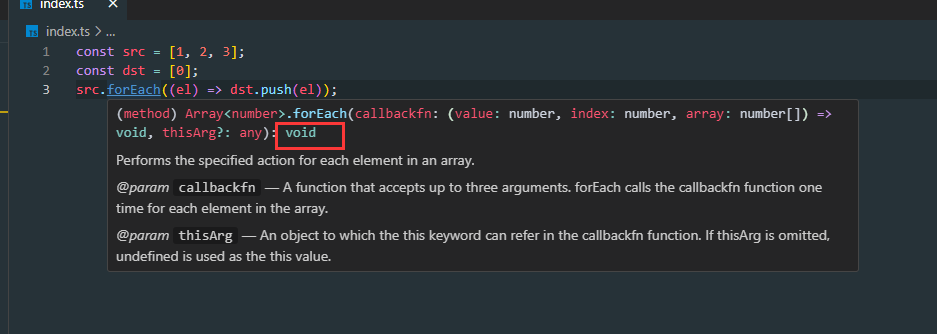
是为了确保如下代码成⽴,我们知道 Array.prototype.push 的返回值是⼀个数字,而 Array.prototype.forEach ⽅法期望其回调的返回类型是 void 。
1 2 3 4 const src = [1 , 2 , 3 ];const dst = [0 ];src.forEach ((el ) => dst.push (el));
8.10、class类相关知识 通过class 关键字创建类,类名我们还是习惯性定义首字母大写 ; 类里面有个constructor 函数,可以接受传递过来的参数,同时返回实例对象; constructor 函数,只要 new 生成实例时,就会自动调用这个函数,如果我们不写这个函数,类也会自动生成这个函数; 多个函数方法之间不需要添加逗号分隔; 生成实例 new 不能省略; 语法规范: 创建类,类名后面不要加小括号。生成实例,类名后面加小括号。构造函数不需要加function; 1 2 3 4 5 6 7 8 9 10 11 12 13 14 15 16 17 18 19 20 21 22 23 24 25 26 27 28 29 30 class Person { name : string age : number hobby : string constructor (name : string , age : number , hobby : string this .name = name this .age = age this .hobby = hobby } info ( console .log (`个人信息:我叫${this .name} ,今年${this .age} 岁!` ); } hobbyCategory ( console .log (`个人爱好:我爱${this .hobby} !` ); this .info () } } const p1 = new Person ("蔡徐坤" , 23 , "唱跳rap" );p1.info () p1.hobbyCategory ()
1)、子类继承父类–extends 1 2 3 4 5 6 7 8 9 10 11 12 13 14 15 16 17 18 19 20 21 22 23 24 25 26 27 28 29 30 31 32 33 class Person { name : string age : number hobby : string constructor (name : string , age : number , hobby : string this .name = name this .age = age this .hobby = hobby } info ( console .log (`个人信息:我叫${this .name} ,今年${this .age} 岁!` ); } hobbyCategory ( console .log (`个人爱好:我爱${this .hobby} !` ); this .info () } } class Student extends Person {}const s1 = new Student ("小阿米" , 18 , "打篮球" );s1.info () s1.hobbyCategory ()
注意点:
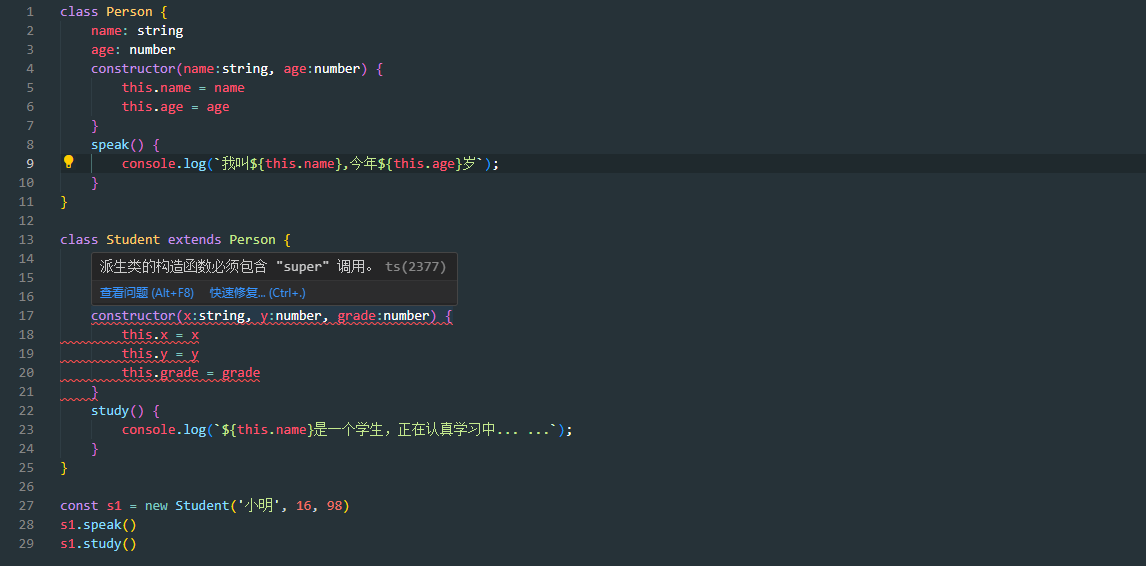
当在有继承的子类中给构造器添加属性,必须使用super,要不然会报错:派生类的构造函数必须包含 “super” 调用。
如下便是super的使用方法
2)、子类访问父类–super 1 2 3 4 5 6 7 8 9 10 11 12 13 14 15 16 17 18 19 20 21 22 23 24 25 26 27 28 29 30 31 32 33 34 35 36 37 38 39 40 41 42 43 44 45 46 47 48 49 50 class Person { name : string age : number hobby : string constructor (name : string , age : number , hobby : string this .name = name this .age = age this .hobby = hobby } info ( console .log (`个人信息:我叫${this .name} ,今年${this .age} 岁!` ); } hobbyCategory ( console .log (`个人爱好:我爱${this .hobby} !` ); this .info () } sex ( console .log ('男/女' ); } } class Student extends Person { grade : number constructor (name : string , age : number , hobby : string , grade : number super (name, age, hobby) this .grade = grade } study ( console .log (`我叫${this .name} ,今年${this .age} 岁,数学考了${this .grade} 分` ); this .info () } override sex ( console .log ('在子类重写从父类继承的方法:男' ); } } const s1 = new Student ("许诺" , 16 , "打篮球" , 98 );s1.study () s1.sex ()
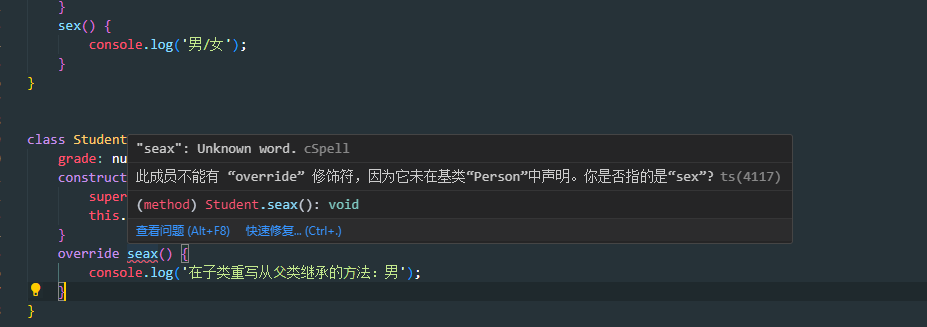
override修饰符的作用
在子类重写从父类继承的方法时,如果方法名和父类不一致的时候会报错提示。
8.11、属性修饰符(ts中才有) 修饰符 含义 具体规则 public 公开的 可以被:类内部子类类外部**访问 。 protected 受保护的 可以被:类内部子类**访问。 private 私有的 可以被:**类内部**访问。 readonly 只读属性 属性⽆法修改。
1)、public 修饰符 一般不写public,默认就是 public。可以被:类内部子类类外部**访问
1 2 3 4 5 6 7 8 9 10 11 12 13 14 15 16 17 18 19 20 21 22 class Person { public name : string public age : string constructor (name :string , age :string this .name = name this .age = age } } class Son extends Person { info ( console .log (this .name ); console .log (this .age ); } } const p1 = new Person ('Tom' , '45' )const s1 = new Son ('Jack' , '18' )console .log (s1.name );
属性的简写形式
必须有修饰符才能简写
1 2 3 4 5 6 7 8 9 / 完整写法 class Person { public name : string ; public age : number ; constructor (name : string , age : number this .name = name; this .age = age; } }
1 2 3 4 / 简写形式 class Person { constructor (public name : string , public age : number }
2)、protected 修饰符 可以被:类内部子类**访问。
1 2 3 4 5 6 7 8 9 10 11 12 13 14 15 16 17 18 19 20 21 22 23 24 25 26 27 28 29 30 31 32 33 34 35 class Person { constructor ( protected name : string , protected age : number ) { } protected getDetails (): string { return `我叫:${this .name} ,年龄是:${this .age} ` } introduce ( console .log (this .getDetails ()); } } class Student extends Person { study ( this .getDetails () console .log (`${this .name} 正在努⼒学习` ) } } const p1 = new Person ('杨超越' , 18 )const s1 = new Student ('杨哈哈' , 33 )p1.introduce () s1.study ()
3)、private 修饰符 可以被:**类内部**访问。
1 2 3 4 5 6 7 8 9 10 11 12 13 14 15 16 17 18 19 20 21 22 23 24 25 26 class Person { constructor ( public name : string , public age : number , private IDCard : string ) { } private getPrivateInfo ( return `身份证号码为:${this .IDCard} ` } getInfo ( return `我叫: ${this .name} , 今年刚满${this .age} 岁` ; } getFullInfo ( return this .getInfo () + ',' + this .getPrivateInfo () } } const p1 = new Person ('张三' , 18 , '110114198702034432' )console .log (p1.getFullInfo ())console .log (p1.getInfo ())
4)、readonly 修饰符 属性无法修改。
1 2 3 4 5 6 7 8 9 10 11 12 13 14 15 16 17 18 19 20 21 22 23 class Car { constructor ( public readonly vin : string , public readonly year : number , public color : string , public sound : string ) { } displayInfo ( console .log (` 识别码:${this .vin} , 出⼚年份:${this .year} , 颜⾊:${this .color} , ⾳响:${this .sound} ` ); } } const car = new Car ('1HGCM82633A123456' , 2018 , '⿊⾊' , 'Bose⾳响' );car.color = '红色' car.displayInfo ()
8.12、抽象类 概述:抽象类是⼀种**无法被实例化的类,专门用来定义类的 结构和行为,类中可以写 抽象方法,也可以写 具体实现。抽象类主要用来为其派生类提供⼀个 基础结构,要求其派生类(子类) 必须实现**其中的抽象方法。 简记:抽象类**不能实例化,其属性和方法是 可以被继承,抽象类⾥可以有 普通方法、也可以有 抽象方法、抽象类中 写抽象方法,在 子类实现抽象方法、抽象类和抽象方法需要 用abstract定义**。 通过以下场景,理解抽象类:
我们定义⼀个抽象类 Package ,表示所有包裹的基本结构。任何包裹都有重量属性 weight,包裹都需要计算运费。但不同类型的包裹(如:标准速度、特快专递)都有不同的运费计算方式,因此用于计算运费的calculate方法是⼀个抽象方法,必须由具体的派生类(子类)实现。
1 2 3 4 5 6 7 8 9 10 11 12 13 14 15 16 17 18 19 20 21 22 23 24 25 26 27 28 29 30 31 32 33 34 35 36 37 38 39 40 41 42 43 44 45 46 47 48 49 abstract class Package { constructor (public weight : number abstract calculate (): number printPackage ( console .log (`包裹重量为: ${this .weight} kg,运费为: ${this .calculate()} 元` ); } } class StandardPackage extends Package { constructor ( weight : number , public unitPrice : number ) { super (weight) } calculate (): number { return this .weight * this .unitPrice } } class ExpressPackage extends Package { constructor ( weight : number , private unitPrice : number , private additional : number ) { super (weight) } calculate (): number { if (this .weight > 0 ) { return 10 * this .unitPrice + (this .weight - 10 ) * this .additional } return this .weight * this .unitPrice } } const s1 = new StandardPackage (10 , 5 )s1.printPackage () const e1 = new ExpressPackage (13 ,8 ,2 )e1.printPackage ()
总结:何时使用抽象类?
定义通用接口:⼀组相关的类定义通用的⾏为(方法或属性)时。 提供基础实现:在抽象类中提供某些方法或为其提供基础实现,这样派⽣类就可以继承这些实现。 确保关键实现:强制派生类实现⼀些关键行为。 共享代码和逻辑:当多个类需要共享部分代码时,抽象类可以避免代码重复。 8.13、interface(接口) 1)、定义类接口 类是无法直接使用extends继承接口的,只能使用implements去实现接口。
1 2 3 4 5 6 7 8 9 10 11 12 13 14 15 16 17 18 19 20 21 22 23 24 25 26 27 interface PersonInterface { name : string age : number speak (n : number ): void } class Person implements PersonInterface { constructor ( public name : string , public age : number ) { } speak (n : number ): void { for (let index = 0 ; index < n; index++) { console .log (`我叫${this .name} , 今年${this .age} 岁` ); } } } const p1 = new Person ('雷军' , 44 )p1.speak (3 )
2)、定义对象接口 1 2 3 4 5 6 7 8 9 10 11 12 13 14 interface UserInterface { name : string readonly gender : string age ?: number run : (n : number void } const user : UserInterface = { name : "张三" , gender : '男' , age : 18 , run (n ) { console .log (`奔跑了${n} ⽶` ) } };
3)、定义函数接口 1 2 3 4 5 6 interface CountInterface { (a : number , b : number ): number ; } const count : CountInterface = (x, y ) => { return x + y }
这里注意区分接口定义类型和普通定义类型
1 2 3 4 5 let count : (a : number , b : number number count = function (x, y ) { return x + y }
4)、接口之间的继承 ⼀个 interface 继承另⼀个 interface ,从而实现代码的复用
1 2 3 4 5 6 7 8 9 10 11 12 interface PersonInterface { name : string age : number } interface StudentInterface extends PersonInterface { grade : string } const stu : StudentInterface = { name : "张三" , age : 25 , grade : '⾼三' , }
5)、接口自动合并(可重复定义) 1 2 3 4 5 6 7 8 9 10 11 12 interface PersonInterface { name : string age : number } interface PersonInterface { grade : string } const stu : PersonInterface = { name : "张三" , age : 25 , grade : '⾼三' , }
总结:何时使⽤接口?
定义对象的格式: 描述数据模型、API 响应格式、配置对象……..等等,是开发中用的最多的场景。 类的契约:规定⼀个类需要实现哪些属性和⽅法。 扩展已有接⼝:⼀般用于扩展第三⽅库的类型, 这种特性在⼤型项目中可能会用到。 8.14、一些相似概念的区别 1 2 3 4 5 6 7 8 9 10 11 12 interface PersonInterface { name : string age : number } interface StudentInterface extends PersonInterface { grade : string } const stu : StudentInterface = { name : "张三" , age : 25 , grade : '⾼三' , }
1)、interface 与 type 的区别 相同点: interface 和 type 都可以⽤于定义**对象结构**,在定义对象结构时两者可以互换。
不同点:
interface :更专注于定义**对象和 类**的结构,⽀持继承、合并。 type :可以定义**类型别名、联合类型、交叉类型**,但不支持继承和自动合并。 interface 和 type 都可以定义对象结构
1 2 3 4 5 6 7 8 9 10 11 12 13 14 15 16 17 18 19 20 21 22 23 24 25 26 27 28 29 30 31 interface PersonInterface { name : string ; age : number ; speak (): void ; } type PersonType = { name : string ; age : number ; speak (): void ; }; let person : PersonType = { name : '张三' , age : 18 , speak ( console .log (`我叫:${this .name} ,年龄:${this .age} ` ) } }
interface 可以继承、合并
1 2 3 4 5 6 7 8 9 10 11 12 13 14 15 16 17 18 19 20 21 interface PersonInterface { name : string age : number } interface PersonInterface { speak : () => void } interface StudentInterface extends PersonInterface { grade : string } const student : StudentInterface = { name : '李四' , age : 18 , grade : '⾼⼆' , speak ( console .log (this .name , this .age , this .grade ) } }
type 的交叉类型
1 2 3 4 5 6 7 8 9 10 11 12 13 14 15 16 17 18 19 20 21 type PersonType = { name : string ; age : number ; } & { speak : () => void ; }; type StudentType = PersonType & { grade : string ; }; const student : StudentType = { name : '李四' , age : 18 , grade : '⾼⼆' , speak ( console .log (this .name , this .age , this .grade ); } };
2)、interface 与 抽象类的区别 **相同点:**都能定义⼀个类的格式(定义类应遵循的契约)
不相同:
接口:只能描述 结构不能有任何 实现代码多个**接口。 抽象类:既可以包含**抽象方法,也可以包含 具体方法, ⼀个类只能继承 ⼀个**抽象类。 ⼀个类可以实现多个接⼝
1 2 3 4 5 6 7 8 9 10 11 12 13 14 15 16 17 18 19 20 21 22 23 interface FlyInterface { fly (): void ; } interface SwimInterface { swim (): void ; } class Duck implements FlyInterface , SwimInterface { fly (): void { console .log ('鸭⼦可以⻜' ); } swim (): void { console .log ('鸭⼦可以游泳' ); } } const duck = new Duck ();duck.fly (); duck.swim ();
九、泛型 泛型允许我们在定义函数、类或接口时,使用类型参数来**表示未指定的类型,这些参数 在具体使用时,才被 指定具体的类型**,泛型能让同⼀段代码适用于多种类型,同时仍然保持类型的安全性。
举例:如下代码中<T>就是泛型,(不一定非叫 T ),设置泛型后即可在函数中使用 T 来表示该类型:
9.1、泛型函数 1 2 3 4 5 6 function logData (data : number console .log (data); } logData (11 )logData ('hello' )
上述当定义好了函数的形参是一个数值类型,那么在调用函数时传入的实参也必须时数值类型。
思考?能不能让函数的形参是一个动态的类型呢?根据函数实参传入的类型而动态变化呢……
1 2 3 4 5 6 7 8 9 10 11 12 13 function logData<T>(data : T): void { console .log (data); } logData<number >(11 ) logData<string >('hello' ) function logData<T>(data : T): T { return data } logData<number >(11 ) logData<string >('hello' )
泛型可以有多个
1 2 3 4 5 6 7 function logData<T, U>(data1 : T, data2 : U): T | U { console .log (data1, data2) return Date .now () % 2 ? data1 : data2 } logData<number , string >(100 , 'hello' ) logData<string , boolean >('ok' , false )
9.2、泛型接口 1 2 3 4 5 6 7 8 9 10 11 12 13 14 15 16 17 18 19 20 21 22 23 24 25 26 27 28 29 30 31 interface PersonInterface <T> { name : string , age : number , extraInfo : T } type JobInfo = { title : string , company : string } let p1 :PersonInterface <string > = { name : 'Jack' , age : 13 , extraInfo : '成绩棒棒哒' } let p2 :PersonInterface <number > = { name : 'Jack' , age : 13 , extraInfo : 250 } let p3 :PersonInterface <JobInfo > = { name : 'Jack' , age : 13 , extraInfo : { title : '你好' , company : '亚新科技' } }
9.3、泛型约束 T extends object 是泛型约束的一种表现。
extends表示具体的泛型类型只能是 object 类型, 某个变量如果能断言成 object类型[变量 as object ] , 那么这个变量的类型符合 T extends object 。就是说该变量的类型可以是T的具体化类型
1 2 3 4 5 6 7 8 9 10 11 12 13 14 interface LengthInterface { length : number } function logPerson<T extends LengthInterface >(data : T): void { console .log (data.length ) } logPerson<string >('hello' ) 通过 T extends LengthInterface ,我们告知 TypeScript 编译器,T 必须具备 LengthInterface 中的所有属性(即 length 属性)。
9.4、泛型类 1 2 3 4 5 6 7 8 9 10 11 12 13 14 15 16 17 18 19 class Person <T> { constructor ( public name : string , public age : number , public extraInfo : T ) { } speak ( console .log (`我叫${this .name} 今年${this .age} 岁了` ) console .log (this .extraInfo ) } } const p1 = new Person <number >("tom" , 30 , 250 );type JobInfo = { title : string ; company : string ; } const p2 = new Person <JobInfo >("tom" , 30 , { title : '研发总监' , company : '发发发科技公司' });
十、类型声明文件 类型声明文件是 TypeScript 中的⼀种特殊文件,通常以 .d.ts 作为扩展名。它的主要作用是为现有的 JavaScript 代码提供类型信息,使得 TypeScript 能够在使⽤这些 JavaScript 库或模块时进行类型检查和提示。
1 2 3 4 5 6 7 8 9 10 11 12 13 14 15 16 17 18 19 export function add (a, b ) { return a + b; } export function mul (a, b ) { return a * b; } declare function add (a : number , b : number number ;declare function mul (a : number , b : number number ;export { add, mul };import { add, mul } from "./demo.js" ; const x = add (2 , 3 ); const y = mul (4 , 5 ); console .log (x, y)
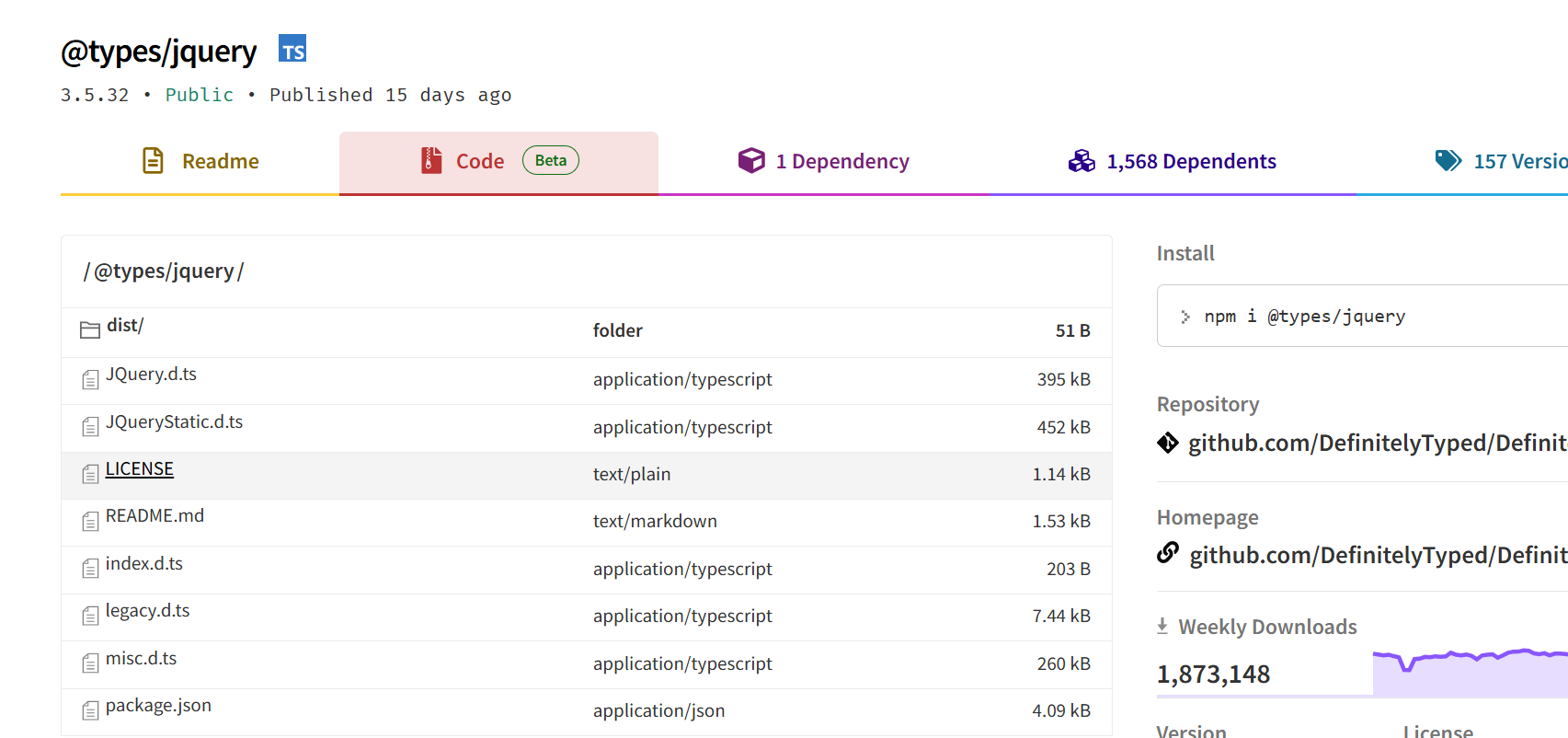
xxx.d.ts 项目中这个这种类型的文件一般都放在@types文件夹中,一般主流的js库都会提供这个文件,例如jquery