React MobX 全面指南 (现代版 MobX 6)
🚀 MobX 是一个经过战火洗礼的库,它让状态管理变得简单、可扩展。与 Redux 的不可变逻辑不同,MobX 拥抱“响应式编程”,通过透明的函数式响应让状态与 UI 自动同步。
目录
- 基础篇:MobX 核心与快速上手
- 进阶篇:异步处理与 React 深度集成
- 高级篇:性能优化与架构最佳实践
- 总结:MobX vs Redux 如何选择
一、 基础篇:MobX 核心与快速上手
1.1 MobX 的核心哲理
MobX 的核心思想是:任何源自应用状态的东西都应该自动地派生出来。
想象一下 Excel 表格:
- Observable (状态):单元格里的原始数据。
- Computed (派生状态):由公式计算出的结果单元格。
- Reactions (响应):当数据变化时,Excel 自动重新计算公式并更新图表。
- Actions (动作):你手动修改单元格数据的行为。
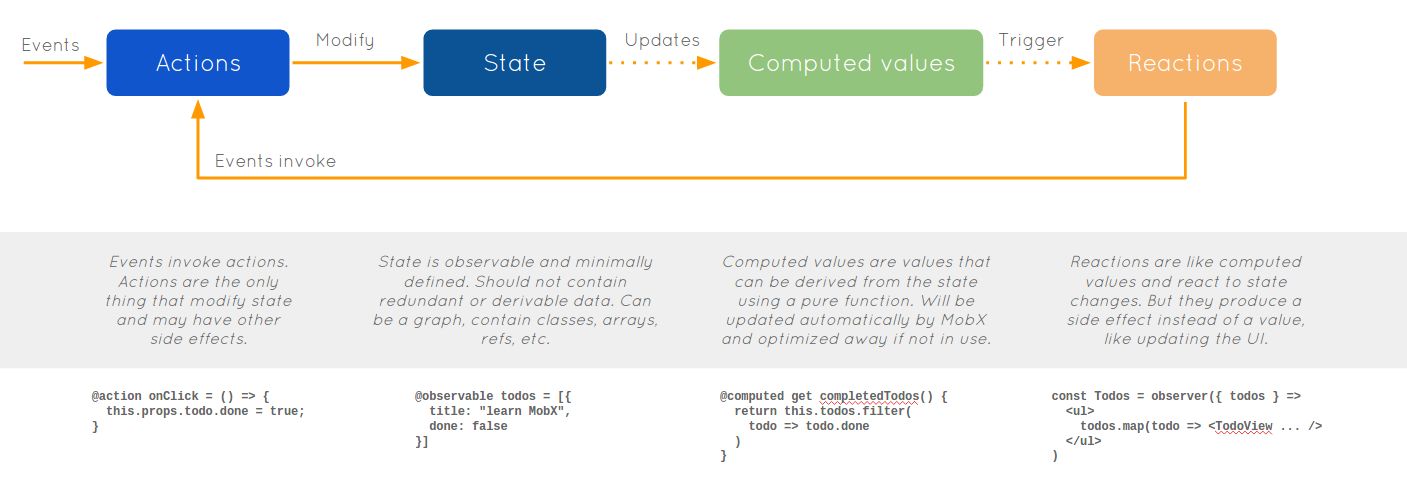
1.2 安装
在现代 React 项目中,你需要安装 mobx 核心库和 mobx-react-lite(专为函数式组件设计)。
1
| npm install mobx mobx-react-lite
|
1.3 核心 API (MobX 6)
在 MobX 6 中,装饰器语法已不再是必需,推荐使用 makeAutoObservable。
1)使用 makeAutoObservable
这是目前最简单、最推荐的写法。它能自动推断属性、方法和 getter。
src/store/CounterStore.js:
1
2
3
4
5
6
7
8
9
10
11
12
13
14
15
16
17
18
19
20
21
22
23
24
25
26
| import { makeAutoObservable } from "mobx";
class CounterStore {
count = 0;
constructor() {
makeAutoObservable(this);
}
increment() {
this.count++;
}
decrement() {
this.count--;
}
get doubleCount() {
return this.count * 2;
}
}
export const counterStore = new CounterStore();
|
1.4 在 React 组件中使用
要在 React 中响应 MobX 状态的变化,必须使用 observer 高阶组件包裹你的组件。
src/App.jsx:
1
2
3
4
5
6
7
8
9
10
11
12
13
14
15
16
17
18
19
| import React from "react";
import { observer } from "mobx-react-lite";
import { counterStore } from "./store/CounterStore";
const App = observer(() => {
return (
<div style={{ textAlign: "center", marginTop: "50px" }}>
<h1>MobX 计数器</h1>
<p>当前数值: {counterStore.count}</p>
<p>两倍数值 (Computed): {counterStore.doubleCount}</p>
<button onClick={() => counterStore.increment()}>增加</button>
<button onClick={() => counterStore.decrement()}>减少</button>
</div>
);
});
export default App;
|
[!IMPORTANT]
切记:如果没有用 observer 包裹组件,即使 Store 中的状态变了,组件也不会重新渲染!
二、 进阶篇:异步处理与 React 深度集成
2.1 异步 Action 与 runInAction
在 MobX 默认的严格模式下,所有对状态的修改都必须在 action 中完成。但是,await 之后的回调并不在 action 的作用域内,因此需要使用 runInAction。
1)实战:模拟 API 获取数据
src/store/UserStore.js:
1
2
3
4
5
6
7
8
9
10
11
12
13
14
15
16
17
18
19
20
21
22
23
24
25
26
27
28
29
30
31
| import { makeAutoObservable, runInAction } from "mobx";
class UserStore {
userInfo = null;
loading = false;
constructor() {
makeAutoObservable(this);
}
async fetchUser() {
this.loading = true;
try {
const response = await fetch("https://api.github.com/users/octocat");
const data = await response.json();
runInAction(() => {
this.userInfo = data;
this.loading = false;
});
} catch (error) {
runInAction(() => {
this.loading = false;
});
}
}
}
export const userStore = new UserStore();
|
2.2 使用 React Context 管理多个 Store (RootStore 模式)
在大型项目中,建议创建一个 RootStore 来统一管理所有子 Store,并通过 React Context 注入,以便在组件中方便获取。
1)第一步:创建 RootStore
src/store/index.js:
1
2
3
4
5
6
7
8
9
10
11
12
13
14
15
16
17
| import { createContext, useContext } from "react";
import { counterStore } from "./CounterStore";
import { userStore } from "./UserStore";
class RootStore {
constructor() {
this.counterStore = counterStore;
this.userStore = userStore;
}
}
const rootStore = new RootStore();
const RootStoreContext = createContext(rootStore);
export const useStore = () => useContext(RootStoreContext);
|
2)第二步:在组件中使用
1
2
3
4
5
6
7
8
9
10
11
12
13
14
15
| import { observer } from "mobx-react-lite";
import { useStore } from "../store";
const UserProfile = observer(() => {
const { userStore, counterStore } = useStore();
return (
<div>
<button onClick={() => userStore.fetchUser()}>加载用户信息</button>
{userStore.loading && <p>加载中...</p>}
{userStore.userInfo && <p>用户名: {userStore.userInfo.login}</p>}
<p>同时也拿到了计数器: {counterStore.count}</p>
</div>
);
});
|
三、 高级篇:性能优化与架构最佳实践
3.1 细粒度渲染优化
MobX 的性能优势在于“精准打击”。只有真正读取了被修改属性的 observer 组件才会重渲染。
优化建议:将大组件拆分为多个小组件。
- ❌ 如果一个长列表在父组件里循环读取属性,任何一个属性变了,整个列表都会重绘。
- ✅ 将列表项封装为
observer(Item),这样只有被修改的那一行会动。
3.2 自动响应:reaction 与 autorun
除了 UI 更新,MobX 还能处理副作用。
autorun:只要依赖的状态变了,就执行。常用于自动保存、日志上报。reaction:更精确。只有指定的属性变了,才执行。
1
2
3
4
5
6
7
8
9
10
| import { reaction } from "mobx";
reaction(
() => counterStore.count,
(count, prevCount) => {
console.log(`数值从 ${prevCount} 变为了 ${count}`);
if (count > 10) alert("数值过高!");
},
);
|
3.3 避坑指南:不要在 observer 外解构
这是一个非常常见的错误!
1
2
3
4
5
6
7
8
9
10
11
|
const { count } = counterStore;
const MyComponent = observer(() => {
return <div>{count}</div>;
});
const MyComponent = observer(() => {
const { count } = counterStore;
return <div>{count}</div>;
});
|
四、 总结:MobX vs Redux 如何选择
| 特性 | MobX | Redux (RTK) |
|---|
| 编程范式 | 面向对象、响应式 | 函数式、不可变数据 |
| 样板代码 | 非常少 | 较多(即使有 RTK) |
| 学习曲线 | 平缓,像写普通 JS 对象 | 较陡,Action/Reducer 概念多 |
| 性能 | 极其出色,细粒度依赖追踪 | 依赖手动优化(Memo/Reselect) |
| 调试 | 较难追踪(黑盒响应) | 非常强大(Redux DevTools 轨迹清晰) |
| 推荐场景 | 快速开发、复杂 UI 交互、企业后台、游戏 | 大型团队协作、对状态流向要求极其严苛的项目 |
Happy Coding with MobX! 建议结合项目实践多次演练。